
Hide Folder and File with WinMend Folder Hidden
WinMend Folder Hidden is a free file/folder hiding tool. While ensuring the absolute system safety, this application can Safely and quickly hide files and folders in local partitions and removable devices. WinMend Folder Hidden support for windows 2K, Xp and Vista 32 and 64 bit version.
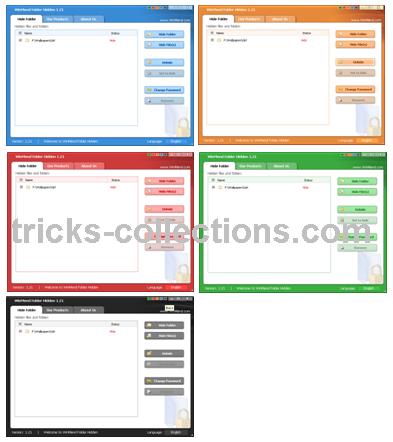
Available 5 colour scheme for WinMend Folder Hidden, so that we will not tire when using this software.
How to use it
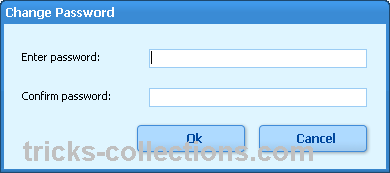
- For the fisrt time run this software You can set a password for this application.
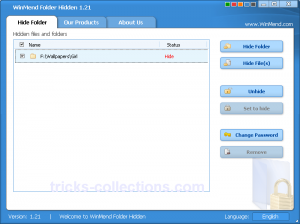
- To add folder will be hidden, click hide folde button. Browse and choose folder to be hidden. To show the folder again checked the folder to be shown then click unhide.

Features of WinMend Folder Hidden
- Safety First, The hiding technology will never damage any file data. It is safe and reliable.
- Hiding and Unhiding instanly.
- Removable Drives are supported ausch as USB drive, memory card, WinMend Folder Hidden are invisible not only in the computer where the hiding was completed, but in any computer.
Download WinMend Folder Hidden
2 Responses
Related to "Hide Folder and File with WinMend Folder Hidden"

USB Flash Security to Protect USB Drive
Find Empty Folder in Your Computer with Fast Empty
IObit Advanced SystemCare Pro 3.6.1 License Code
How to Remove the Effects of Virus on Windows Oper

2 Responses to “Hide Folder and File with WinMend Folder Hidden”
WinMend mafunctioned for me. It won’t detect files that I have hidden. Nothing will get them back. Not a safe program, so use at your own risk.
You probably used Winmend Folder Hidden with some sort of “washer” software or any programming/configuration that affects the recycle bin.
From my experience, what I understand is that Winmend Folder Hidden cloaks its hidden files as Recycle Bin related manifestations. If any action wipes Recycle Bin clean of these manifestations or resets it to its original, you would probably lose your hidden files.
Look on the bright side. At least other people will never know what you hid.
Winmend Folder Hidden is “free”. If you need a heavy duty cloaking software, you need to pay for it my friend.