
Reset Counter Printer Epson R1800 and R2400
The reset method Epson R1900 almost same as reset method for Epson R2400. You can use adjustment program or Epson SSC service utility (also called SSC software) to reset the both Epson printer type. But I suggest you use SSC software because this software is freeware and support most Epson printer model. The SSC software that can be used to reset EPson R2400 is SSC ver 4.30 whereas the SSC software that can be used to Epson R1800 is SSC serve 4.20 or newest version.
If you reset the both epson printer using adjustment program, you can use adjustment program for Epson R1800 and R2400. Unlike other adjustment program, adjustment program for Epson R1800 and R2400 does not require date setting when using it in your computer to reset the both epson printer.
Here the screen-shot Adjustment Program Epson R1800 and R2400
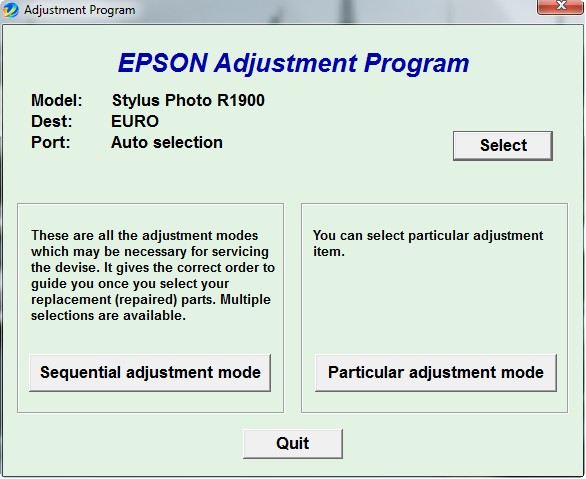
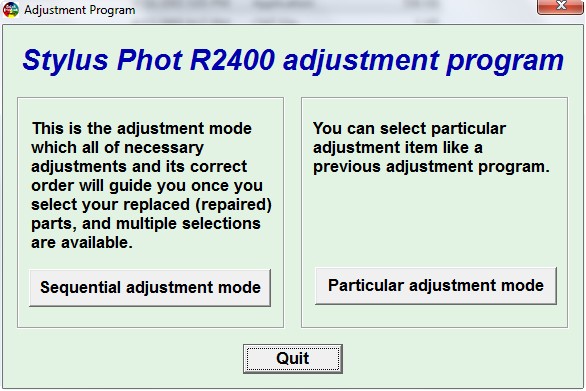
Resetting using adjustment program
- Run the adjustment program (click AdjProg.exe to run the software. For adjusment R1900 click loader.exe to run the software) and then click particular adjustment mode. You can download the adjustment program from download link below.
- Select printer port where the printer installed or select auto selections.
- Double click waste ink pad counter
- Click initialization to clear the counter
Reset using SSC serve software
- Run and install SSC software.
- Run setting in the printer model section and equalto the printer the close the setting.
- Right click mouse on ssc icon in the system tray, select “protection counter” then click “reset protection counter”, Ok.
- Turn off the printer the turn on again, and the printer should be Ok
To download adjustment program R1800, Adjustment Program R2400 and SSC software click following link.
- Download Adjustment Program Epson R1800
- Download Adjustment Program Epson R2400
Related to "Reset Counter Printer Epson R1800 and R2400"

Resetting Ink level Black and Color Ink Cartridge
SSC Software, Epson Chips Resetter for Free
Reset Ink Level Cartridges PG-40 and CL-41 in Cano
Manual Resetting Method for Canon Pixma MP520

One Response to “Reset Counter Printer Epson R1800 and R2400”
this link is dead.