
XWindows Dock add MAC OS X Style Dock on Windows
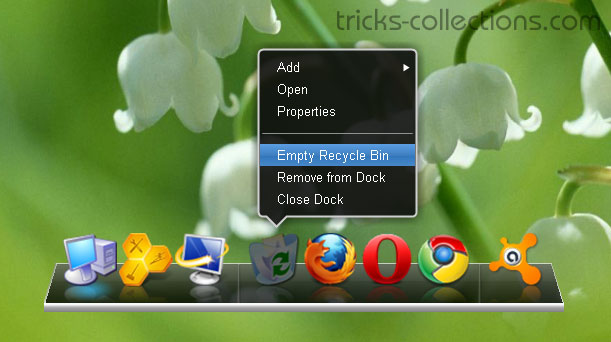
With XWindows Dock you can bring MAC OS X Style Dock to Windows you can do it easily. XWindows Dock is a new dock for Windows which is the best Mac dock emulator. It provides all graphics affects like reflections, transparency, shadow, blur, etc. XWindows Dock provides fully compatibilities with Windows 7 and Windows Vista and probably works fine on Windows XP. One interesting feature of the XWindows Dock is you can change the skin on your own XWindows Dock. Here the Screenshot of XWindows Dock when I try on my PC:
Features of XWindows Dock
- Drag & Drop, let’s use drag & drop everywhere. Set an icon for any application or add whatever you want to see in the dock – just drop it!
- You can make own skin for XWindows Dock
- Life reflection, get very realistic software on your own PC. All your actions will be reflected on the dock in real time fast and quality.
- XWDock supports multi-monitor configuration.
- Skin should have 2D mode for placing at the top, left or right part of the screen.
0 Responses
Related to "XWindows Dock add MAC OS X Style Dock on Windows"
AOMEI Backupper in 2016

Add DreamScene to Windows 7, Vista and Windows XP

Adding Windows Vista Flip to Windows XP with WinFl
How to Make Windows XP Look Like Ubuntu
