
Download Software System Repair Engineer
 System repair Engineer is a tool to adjust, repair and find unknown malwares on your windows system. With this tool you can detect your system issues and repair easily. To use System Repair Engineer software is easy and no installation require. The latest System repair engine added infected virus detection and can be used to repair general case windows system after infected by viruses.
Here how to use system repair engineer software.

- Download System Repair Engineer and extrac the downloaded file. (tips: to download complete repair engineer software include plugin download KZTechs.COM Software Suite)
- Run by clicking file named “SREngLdr.exe”.
- Click boot items icon to view list of startup program when windows start.
- Click System repair to repair windows system.
Since System Repair Engineer ver 2.2, System Repair Engineer add plug-ins support. At this time, there are 4 available plugins for system repair Engineer. You can download the official plug-in for free.
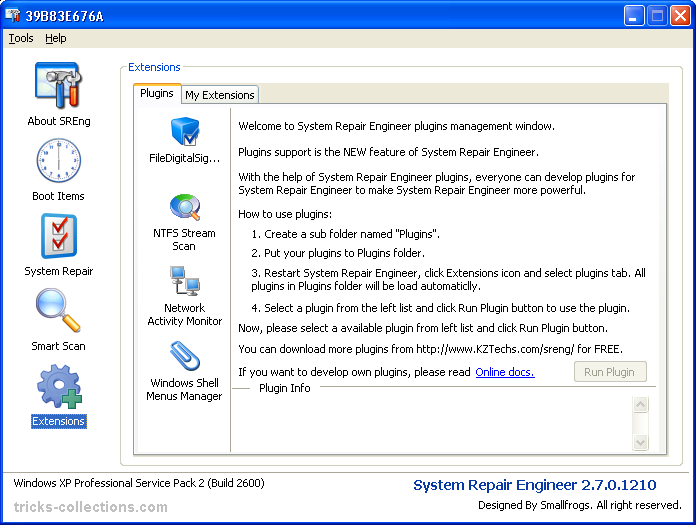
- NTFS Stream Scanner, The plug-in also support copy NTFS steam info to file.
- Windows Shell Menu Manager, Used to manage Windows shell menus, such as the context menu when you right click on the desktop and so on.
- File Digital Sign Verify, Used to verify file digital sign and get signer name of specified file.
- Network Activity Monitor, Used to get TCP/UDP connection status from your network adapter and show the detailed info of the connection, such as process name, remote address and port, local address and local port and so on.
How to install plugins:
- Create a sub folder named “Plugins”
- Out the system repair Engineer to plugins folder
- Restart system repair Engineer software then click extentions icon then plugin tab, all plugins in the plugins folder will be load automatically.
1 Response
Related to "Download Software System Repair Engineer"

The Best Free System Utility, iObit Advanced Syste

Giveaway Free Wondershare WinSuite 2012 License Ke

Steganos Privacy Suite 12 Free License Key
VLC Media Player 2.0 - Lightweight, Fast & Ver

One Response to “Download Software System Repair Engineer”
I have tried OVER AND OVER to download that god damn system repair engineed with no luck. When I unzip the file like you said i click on SREngLdr.exe and run I get a popup saying this version has expired and hit a dead end right there. How the hell can I download it anyone know?