
4 Portable Free Duplicate File Finder
Usually we don’t know if there duplicate data on our computer. This duplicate file will reduce space on on hard drive. One way to detect duplicate files on your computer that is duplicate file finder. There lots duplicate data finder around internet many of them is free. On this post I only mentioned the portable version of this software and all software mentioned here release as freeware.
With Duplicate file finder you can find all duplicate file on your computer and you can run the software from hard drive, Flash drive, USB drive, memory card and other because this software require no installation.
Here 4 portable duplicate file finder can be used to find duplicate file on your computer for free:
1. DoubleKiller
This software have most comprehensive feature among the four software mentioned here. File size of DoubleKiller is 392Kb. This tool can find all file with attribute system, hidden, read only and archive. To fined duplicate file on PC using DoubleKiller you can follow this steps:
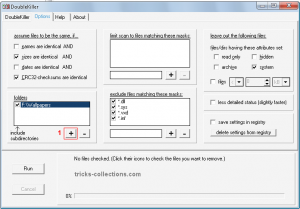
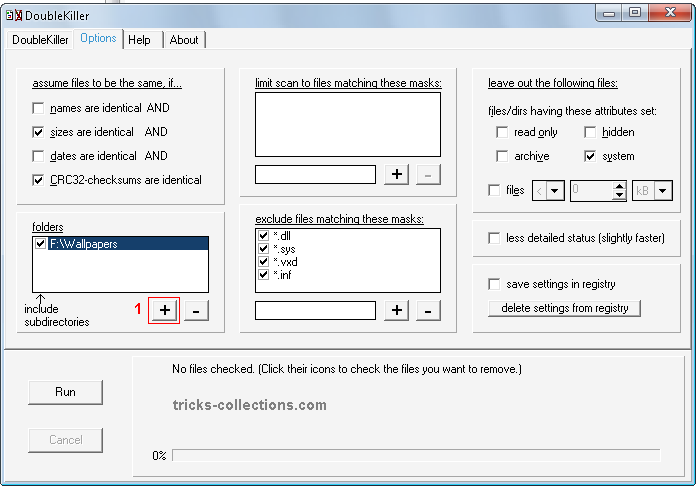
- Run the software. Click option Tab, add a folder to be scanned by clicking “+” button (1). Click Run to search duplicate file.
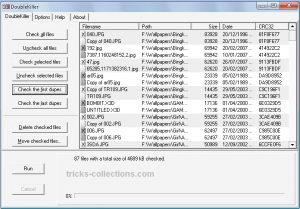
- If this software finding the duplicate file will be showed in DoubKiller Tab. You can delete the duplicate file by checked the files one by one or using automatic checked by clicking “Check the Fist Dupes” or “Check the Last Dupes” then click Delete checked files.

2. Easy Duplicate Finder
Easy Duplicate Finder came with easy to use interface. unfortunately this software not provide auto select or auto checked for duplicate file that detected with this tool, so to delete the duplicate file you must check/select and delete the file one by one. Its will waste your time if there are thousand duplicate file on your PC.
To use this software you can follow these steps:
- Run the software. Select the folder or drive to be scanned then click start button to search the duplicate files.

- Check the duplicate files to be deleted the click “delete selected” button.

Easy Duplicate Finder have two version, install version and portable version and available for Windows 95, 98, ME, NT, 2000, Xp, 2003, Vista.
Download this software: http://www.easyduplicatefinder.com/download.html
3. Duplicate File Finder
Duplicate file finder have almost the same name with Easy duplicate file finder. The latest version is duplicate file finder 2.5. appearance of this software is very simple and easy to use. On this software having auto checked feature to delete duplicate file easily.
Here how to use this software are:
- Run the software. Click Add Path button to add a folder or drive.
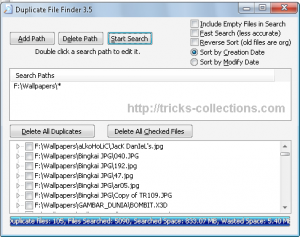
- Click Start Search to search the duplicate files.
- Check duplicate file and click delete button to delete it.

This software available for windows 98, XP and Vista. Download DupFinder
4. DirComp
DisComp is old software, when I checked on the DirComp website there no newest version for this software. File size of software is very small 42 Kb only.
How to use this software:
- Run the software.
- Click + button (1) to add the folder to be scanned. Click run button (2) to start seach duplicate file.


Related to "4 Portable Free Duplicate File Finder"
7 Quick Fix Free Software to Repair Windows 7

Download Ashampoo WinOptimizer Free
Free Serial Number Ashampoo Internet Accelerator 2

Tweak Me Small and Powerful Windows System Tweaker

4 Responses to “4 Portable Free Duplicate File Finder”
Duplicate Finder is much better software to find and remove duplicate files. http://www.ashisoft.com
Latest version of Easy Duplicate Finder has many changes you will like, such as being able to auto select all duplicates by newest, oldest, file name string etc…
Another tool for duplicates is “DuplicateFilesDeleter” I’ve been using this for over a year now guaranteed fix.
I have tried the software called “DuplicateFileDeleter” .Its amazing, i have tried this, its a cool software to use for deleting duplicate files.