
Resetter Canon iP1200, iP1600, iP2200
Resetter Canon iP1200, iP1600, iP2200. Canon Pixma iP1200, iP1600, iP2200 is canon Inkjet printer that deliver beautiful result for photos printing and documents. This canon inkjet printer is designed for home uses. These printer equipped with canon cartridges CL 41 and PG40.
The software resetter Canon iP1200, iP1600, iP2200 provides solution if you need to reset the three inkjet canon printer types. This software resetter can be used on windows XP or older version of windows.
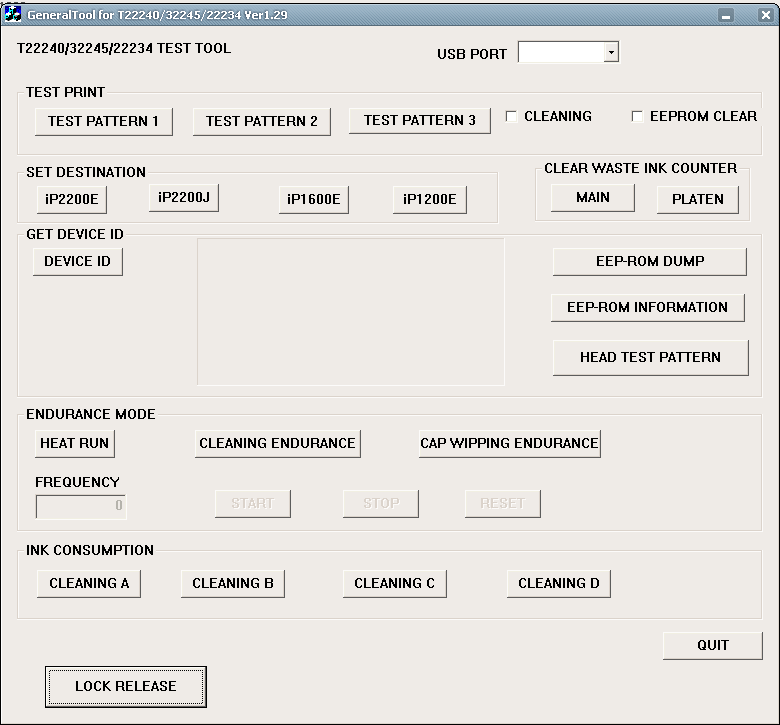
How to Reset Canon iP1200, iP1600, iP2200
- Download software for Canon Pixma iP1200, iP1600, iP2200 Printers from download link above.
- Extrac downloaded file by extracded software like WinZip, 7Zip, Izarc, etc.but I recommend to use 7zip, because this software free and usefull and support many compresion format,
- Goto extracted folder and then this tool by clicking GeneralTool.exe file
- Select the connected USB port number from USB PORT where your printer installed.
- Click LOCK RELEASE, and select the applicable model name printer in SET DESTINATION section. there are four choice there that is iP2200E, ip2200j, ip1600e, ip1200e . corresponding to your printer
- To reset waste ink counter In CLEAR WASTE INK COUNTER section, select MAIN or PLATEN. The selected waste ink counter will be reset. MAIN resets the main waste ink counter, PLATEN resets the platen waste ink counter. If both the main and platen waste ink absorbers are replaced, reset both the main and platen waste ink counters.
Resetter Canon iP1200, iP1600, iP2200 can be downloaded from this link: DOWNLOAD Service Tool Software for Canon Pixma Printer iP1200, iP1600, iP2200
4 Responses
Related to "Resetter Canon iP1200, iP1600, iP2200"

Software Resetter Printer Canon i320
Free Download Software Resetter for Canon Printers
How to Reset Counter Canon ip2770
Led Error code for Canon IP1300, IP1700, IP1200, I

4 Responses to “Resetter Canon iP1200, iP1600, iP2200”
How do I change my Canon Pixma iP1200 to print in black only. It’s connected to an Apple Mac.
It is currently printing in gray and faint colour shades.
Thanks.
MG
thank for resetter
gracias
need reseter for canon pixma p200 please ..