
Tips for AVG Antivirus 8
This tips n tricks can be used at AVG 8 free and or AVG 8 professional editions. Interface AVG 8 differing from old version AVG antivirus so that for new user possibility will confuse. Following tips and tricks for AVG 8 was often used :
1. How to use Offline update in the AVG Antivirus 8
Double click AVG systray icon to open AVG user interface, then select tools menu – update from directory . Go to file update directory then click ok.
2. Systray Icon Not Active after Updated AVG 8
Sometime having taken steps offline update, systray icon AVG 8 show signing not active.

The solutions :
- Double Click systray icon Avg or open AVG user interface.
- Select tools menu then advanced setting.
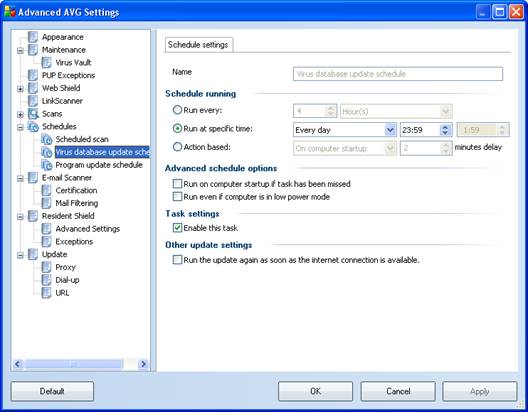
- After advanced AVG settings appears, Click schedules – virus database update schedules, enable this task and in the right windows uncheck (disable) this item
- Run on computer start-up if task has been missed
- run even if computer is in low power mode.
- In the Program update schedule disable this task setting.
3. Don’t disable all components in the over view windows.
1 Response
Related to "Tips for AVG Antivirus 8"
How to Change Kaspersky Internet Security 2011 Int

Giveaway BitDefender Antivirus 2010 with Activatio

Download Outpost Security Suite Free Edition
Download Panda Antivirus Pro 2010 Includes 3 Month

One Response to “Tips for AVG Antivirus 8”
Neat trick for AVG.
Trackbacks/Pingbacks